HOWTO take a screenshot
Taking a screenshot of your application or desktop in GNU/Linux can be done in countless ways using a broad variety of specialized graphical screenshots programs, advanced image editors and small terminal tools. Here are some of the many ways you can take a screenshot in a Linux environment.
The Print Screen Button[edit]
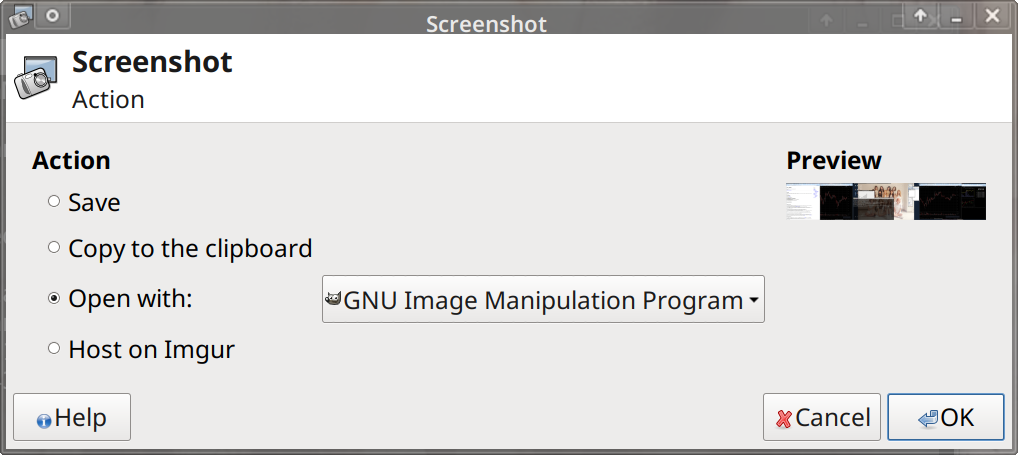
While it may seem obvious that pressing the Print Screen key (sometimes labelled "PrtSc") will let you take a screenshot in XFCE4 and KDE Plasma it's actually something few people know. Now you know: Pressing that fine key which located on the left side of the top row on your keyboard (first key after the F1-F12 row) will take a screenshot and open a small program which allows you to open that full-screen screenshot in a program like Krita or GIMP or save it to a file. This is what the dialog you get when pressing Print Screen in Xfce4 looks like:
Using a graphical program[edit]
The functionality which allows Xfce to take a screenshot of the entire screen when the Print Screen key is pressed is provided by a program called xfce4-screenshooter and it can be used as a stand-alone tool for taking screenshots of the entire screen or an active window or a region of the screen - with a set delay before capturing. That binary can be assigned to a hotkey in the settings. It does not appear to be anywhere in the menus of Xfce or any other desktop environment.
Every single desktop environment appears to have it's own GUI tool which works like xfce4-screenshooter described above and these can be installed and used on any desktop environment. Most of them are actually NOT as good as the screenshot-tools provided by KDE Plasma and Xfce.
- Deepin has a tool called
deepin-screenshotwhich can be installed on any desktop. It will, unlike other similar tools, turn the mouse cursor into a selection tool which can be used to select an area of the screen and save a screenshot. We do NOT like this tool at all. Everything else is easier and quicker. - MATE's got a tool called
mate-screenshot. It will take a screenshot and open a dialog where you can "Save" or "Copy to Clipboard" or take a "New" screenshot. It's fine but MATE's tool lacks the option of directly opening a screenshot in another program like Krita or GIMP. - KDE Plasma activates a screenshot program called spectacle when the PrintScreen button is pressed. spectacle lets you capture screenshots of the entire screen, a single window, the window under the mouse pointer or a selected area with or without a delay. It is the most feature-complete and easy to use screenshot program of all and a good choice to use as keybinding for the PrtSc key in any desktop environment.
Most graphics programs and editors have a screenshot function built-in.
- The simple paint program KolourPaint, which you probably have if you are using KDE Plasma, allows you to take a screenshot by selecting the menu
FilethenAcquire screenshot. It allows you to select a delay but not a specific window, it can only be used to take a screenshot of the entire screen. - You can take a screenshot with GIMP by going to the main menu
FilethenCreatethenScreenshot. GIMP's dialog box for taking screenshots has the option of taking a screenshot of the entire screen or a program with or without window decorations. It supports taking a screenshot with a delay.
Using the command-line in a terminal[edit]
If you have imagemagick installed, and you probably do (click here to install on Ubuntu if you don't) then you can use it's import (manual page) program to take a snapshot of your dekstop. Use it like this:
import -window root screenshot.png
You can also use xv. xv is in principle for interactive image display but it's secretly got quite a few image conversion and manipulation features listed in xv --help (but not in [it's manual page for some reason). You can use it to take a screenshot with:
xv -grabdelay 2 myimage.jpg
There is also scrot. It is a standalone program you probably don't have pre-installed but it's easy to install since it's in all distributions repositories. It's been around since 2000. One interesting advantage it has is that you can save filenames using patters,
scrot '%Y-%m-%d_$wx$h.png' will create a screenshot file named something like 2019-10-30_2560x1024.png which makes it easy to know time and resolution later on.
The oldest program for taking a screenshot of X from a terminal that's still around is probably xwd. It's been around since forever and comes with X so probably have it installed. You probably don't want to use it but if you do you can use it like this:
xwd -root -out test.xwd
Screenshots created by xwd has to be saved as .xwd files. GIMP supports those and so does some obscure thing called xwud but that's about it.
Taking a screenshot of a framebuffer terminal[edit]
The best option for taking a screenshot of your framebuffer terminal at VT1 appears to be fbgrab. Using it once you have it is strait forward,
fbgrab screenshot.png
however getting it is not. Distributions do not come with it and most don't have it in their repositories. Thus, you need to get it from it's homepage at https://www.fbgrab.monells.se/ and compile it yourself.

Enable comment auto-refresher